

Adopt SuccessFactors AI at Your Own Pace
Artificial Intelligence (AI) is one of the hottest topics in HCM technology. Salespeople focus on agentic AI, autonomous HCM, and major business transformations. Whilst these are definitely exciting and will deliver much value, many organisations are looking for an easy way to get started with SAP SuccessFactors AI.
The good news is that not every AI use case needs to be complex, controversial, or require a large investment. SAP SuccessFactors already offers a range of AI capabilities through Joule and native Generative AI (genAI) features that can deliver value today. Most of them are easy to implement, require little change management, and help employees become comfortable with AI-supported work. So, in fact, they are part of the change management by providing a gentle start instead of a steep climb.
This article introduces five simple AI scenarios demonstrated in the accompanying video series. Together, they show how small improvements in user experience and productivity can build the foundation for broader AI adoption in the future.
Demo 1: Navigation Assistance from SuccessFactors AI
One of the simplest AI use cases in SAP SuccessFactors is helping users find their way around the system.
Experienced HR users and consultants often underestimate how helpful this can be for occasional users. Employees and managers may only perform certain tasks a few times per year and simply do not remember where to find them.
With Joule, users can ask for an action they want to perform, and the assistant guides them directly to the relevant location in the system.
Typical examples include:
- Finding career opportunities
- Requesting leave
- Viewing compensation data
- Accessing performance documents
- Finding organisational information
While this may seem like a modest capability, reducing navigation effort can improve user satisfaction and reduce support effort.
Demo 2: Access Information Easily with SuccessFactors AI
The next step beyond navigation is information retrieval.
In many situations, users simply need an answer based on SuccessFactors data. Without Joule AI, they would have to remember where the information is stored and navigate through screens to access it. SuccessFactors AI with Joule can provide many of these answers directly through conversational interaction.
Examples include:
- Looking up an employee’s phone number
- Checking a date of birth
- Finding a cost centre code
- Establishing your remaining leave entitlement
- Retrieving other personal or organisational information
From a business perspective, these use cases can offer a surprisingly good return on investment because they save small amounts of time across a large number of interactions.
Video 3: An End-to-End Leave Request Process Through Joule
SuccessFactors AI gets even more interesting when it supports small business processes end-to-end rather than individual steps.
This demo video shows a simple three-step leave management scenario executed through Joule on SuccessFactors:
- Employee checks remaining leave balance
- Employee submits a leave request
- Manager reviews and approves the request
None of these activities are revolutionary. The value comes from completing the entire process through a simple and consistent conversational experience. Again, we see: business value can come from simplifying everyday interactions without introducing highly sophisticated automation on day one.
Video 4: The SAP SuccessFactors AI Writing Assistant
The AI Writing Assistant is one of those features that may appear trivial at first glance. After all, most people can write a few sentences without help from AI – for now.
However, the SuccessFactors Writing Assistant makes many people’s lives a bit easier and system-based processes a bit more efficient. It helps users to create and improve text in various HR processes, including, but not limited to:
- Compensation Management
- Performance Reviews
- Employee Profile maintenance
- Job adverts
Its advantages include:
- Saving time across many small interactions
- Transforming informal text into a more professional style
- Supporting line managers who are less confident in business writing
- Helping non-native speakers communicate effectively
- Translating content from the user’s native language into the system language
For global organisations in particular, these features can improve consistency and reduce communication barriers without requiring significant effort from IT to set it up. This also makes it low-hanging fruit for driving inclusion.
Note: like most so-called genAI capabilities, the SuccessFactors Writing Assistant is a premium AI feature, so you need to procure AI Units from SAP to use them. The same applies to our next example.
Video 5: SuccessFactors AI-Generated Compensation Insights
The final example moves beyond productivity gains and shows how Generative AI can support decision-making.
Preparing for compensation reviews or just replying to a quick question from an employee often requires managers to gather information from multiple locations. Understanding an employee’s compensation history, current position, salary band, one-off payments and overall context can be surprisingly time-consuming.
The Compensation Insights feature addresses this challenge by collecting relevant information from various places and presenting a valuable overview.
Benefits include:
- Faster preparation for compensation reviews
- Higher-quality decision making, because all information is available and put in the right context
- Reduced effort when making ad-hoc compensation decisions
For line managers, even modest efficiency gains during compensation planning cycles can represent a significant productivity improvement.
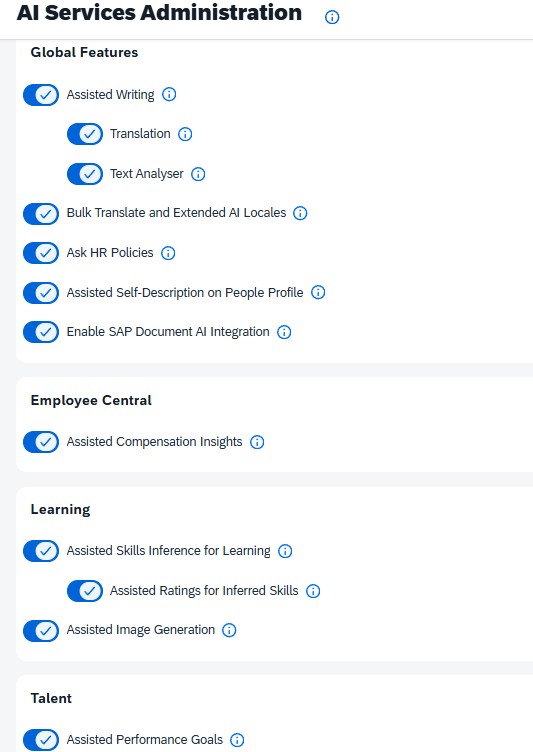
This example works with Employee Central data and does not require the SuccessFactors Compensation Module. However, it is a SuccessFactors Premium AI feature and requires SAP AI Units. Once Premium genAI has been activated, the feature can be enabled through AI Service Administration:
Where next with SAP SuccessFactors AI?
There are more than 100 simple use cases like the ones shown above. If you haven’t activated them yet, I recommend getting started today. By getting employees and managers to adopt AI in such straightforward, low-risk scenarios, you build a strong foundation for the more transformative capabilities yet to come.
Some of those advanced capabilities include:
- Document grounding allows users to query Joule about the content of policy documents and similar sources („What rental car class am I entitled to?“)
- Accessing Joule from other entry points than SAP SuccessFactors such as SAP Concur or simply any browser window
- Connecting SAP Joule and Microsoft CoPilot
- AI Agents in SuccessFactors to perform certain tasks automatically until getting to an intended „human in the loop“ review point
- AI-driven People Insights in SAP BDC (Part of BAIP)
Need any help with your SuccessFactors AI strategy or setting it up? Just shout!

Sven Ringling arbeitet bei ORBIS People im Bereich HCM Lösungen, insbesondere SAP SuccessFactors, Payroll, HR Shared Service und KI.
In über 30 Jahren als Consultant für die HR-Lösungen der SAP hat er für Beratungen in Deutschland, UK und Belgien gearbeitet und umfassende Erfahrungen gesammelt in Kundenprojekten unter anderem mit SAP HCM (on-premise) einschl. Payroll, SAP Concur, SAP SuccessFactors, Workforce Software, Qualtrics Employee Experience und Enterprise Service Management.