

Another Article about Employee Central Payroll: why and for whom?
Employee Central Payroll is SAP’s go-forward solution for the vast majority of customers. And yet, there are many misunderstandings and outdated opinions not just by customers and buyers, but also by consultants and even SAP’s own sales reps.
I’ve recently posted a clarification for a common misconception about EC-Payroll in an SAP SuccessFactors Community on Linkedin. This has turned into a min-series of ECP myth busters and some people just asked me to put everything together in one place. So, today, this article starts as a collection of 5 myths and more will be added in future. Watch this space!
This article is relevant for everybody currently using
- SAP ECC HCM Payroll on-premise or private cloud
- SAP HCM for S/4HANA Payroll on premise or private cloud
- SAP HCM (any version) integrated with a 3rd party payroll
- SAP SuccessFactors integrated with a 3rd party payroll
- even EC-Payroll itself, as we found current users often don’t really make good use of what they are paying for
The clarifications and revelations are also important for you, if you are
- currently looking for a new Payroll solution or full HRIS+Payroll
- advising on or implementing SAP SuccessFactors HCM and/or EC-Payroll
- selling SAP HCM and Payroll solutions
Without further ado, let’s bust some SAP Payroll myths.
SAP EC-Payroll Myth #1: Limited Global Reach

I still hear this again and again: many people still think SuccessFactors Employee Central Payroll is not ready for countries with complex payroll like Germany, France, Italy, Austria, The Netherlands etc.
This could not be further from the truth! In fact, EC-Payroll is as fit for German Payroll and many other countries as the old on-premise SAP Payroll is. It’s obvious, because the old battle-tested Payroll still constitutes the core of EC-Payroll. Plus: it comes with additional innovations. Until recently there were restrictions for the German public sector, but SAP has addressed those by now.
The reason for this myth is probably the confusing naming by SAP. They started building a completely new Payroll for SuccessFactors a few years ago with the working name „SAP Next Generation Payroll“. This is not available for Germany and other complex EU markets. And there is currently no plan to make it available for most countries. (It is used in the UK, though). The Problem: the official name for this product is now „SuccessFactors Payroll“ or „SFPAY“. This doesn’t make sense, as the main go-forward Payroll solution with SAP SuccessFactors is Employee Central Payroll! Who would think, that something labelled „SFPAY“ is an exotic niche product? So many people get confused between the two.
You may think SAP deserves loss of revenue for such a naming accident and therefore shun Employee Central Payroll. However, why would you want to punish yourself by not considering a perfectly solid payroll solution?
Myth busted: Employee Central Payroll is available for 60+ countries including Germany, Austria, Switzerland, the UK, France and the Netherlands.
SAP EC-Payroll Myth #2: Restriction on Custom Code
Another popular myth: „We can’t change standard logic with ABAP code in Employee Central Payroll.“
That’s just wrong! You are not supposed to modify standard code, but that’s rarely a good idea in Payroll anyway. Apart from that, you can
- use all the BAdIs
- create custom functions and operations
- Write your own ABAP („Z-programs“)
- Create your own dictionary objects like tables, classes, web-dynpros,…
Well, should there be an exceptional case where you can’t comply with regulation without making a standard code modification, even that should be granted as an exception. Even without that option, though, you can make almost any amendment to the payroll logic you want. I do recommend you keep it lean, though. The SAP Payroll Schema logic is extremely flexible as it is. And most of the UI processes are running in SuccessFactors anyway, if they aren’t even replaced by a conversation with Joule AI.
Myth busted: all custom coding apart from hard modifications of standard code are available in Employee Central Payroll
SAP EC-Payroll Myth #3: the 1000 Employees Minimum
The myths around SAP Employee Central Payroll are as plentiful as the stories of the old Nordic Gods and heroes. And just like the Nordic Sagas, our third EC-Payroll myth has a good deal of truth inside: „You can not use EC-Payroll for less than 1000 Employees.“
Well, of course you can run payroll for as few people as you want to, but it is right: under the normal SAP subscription policy, you have to pay for a minimum of 1000 employees. There is no way around it…
…unless you turn to an SAP SuccessFactors MSP Partner (Managed Service Partner). Those partners bulk-buy subscriptions from SAP within a special licensing framework and re-sell them to customers in chunks as small as they like. ECP subscription for 350 employees? No problem! There is nothing dodgy in this. It’s official and part of the SAP strategy to let partners work on the nitty gritty with customers. After all, they know customer circumstances better anyway. The deals are usually quite good, too.
There are caveats, though: the partner must sell some service as part of the package and is managing the system for many customers. Each customer has one client inside the system. Therefore, it is paramount that customers cannot make any cross-client changes or have access to data in other clients. Such changes, patches, upgrades etc. are managed by the partner.
Also, the customer must buy some service starting from just patches and maintaining legal compliance to making all config and even run the payroll for the customer. In most cases, customers buy some services anyway even outside an MSP context. And the packages can be very attractive. If you are interested, let us know, as ORBIS People happens to be an MSP.
One point to remember: the MSP agreement can be complicated contractually, when other SuccessFactors subscriptions are already in place. Therefore, customers with less than 1000 Employees starting their SuccessFactors journey, should always discuss their possible roadmaps with a competent advisor, if ECP is considered an option in future.
Myth busted: You can subscribe to ECP for any number, even far less than 1000 employees, when involving an MSP partner
SAP EC-Payroll Myth #4: Poor UI without Dynamic Actions
Mash-ups in SAP SuccessFactors are a way to access data in EC-Payroll or even in on-premise Payroll through the SuccessFactors UI. They constitute a so called User Interface (UI) Integration. Many customers and even consultants miss a trick, when it comes to mash-ups. And this sometimes gives mash-ups an undeserved bad name: „The SuccessFactors based modern UI is great, but for some infotypes we need to use mash-ups and they don’t process dynamic actions. That creates a poor user experience.“
Well, it is true that dynamic actions don’t work the in de-coupled infotype framework and therefore not in mash-ups. However: dynamic processing rules replace dynamic actions, so you can have pretty much the same functionality in mash-ups within the SuccessFactors UI.
A typical example: Garnishments in Germany can be quite complicated. Depending on the type chosen, a sequence of several further infotypes is processed. If customers don’t use dynamic processing rules, users of mash-ups have to know which ones are needed and select them one by one. Not user friendly! The dynamic processing rule automatically creates the correct sequence of infotypes to move through in the mash-up in the SuccessFactors people profile:
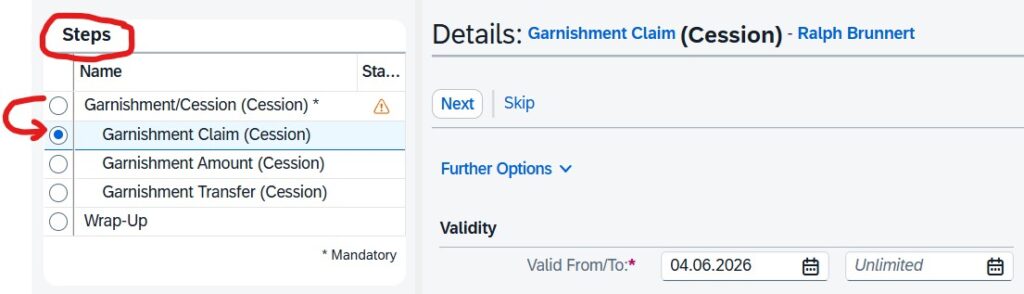
Bonus tip: your existing dynamic actions configuration can be automatically migrated to dynamic processing rules with a standard tool provided by SAP.
Myth busted: with dynamic processing rules you can replace dynamic actions in infotype mash-ups in Employee Central
SAP EC-Payroll Myth #5: Missing GUI-Access for Technical Tasks
This is a simple one aiming most notably at technical specialists. Most activities in Employee Central Payroll are best performed out of the SAP SuccessFactors UI – and in future increasingly through a dialogue with Joule AI. Normal payroll staff should not require a different access.
However, for some technical tasks like deep dives in the log, configuration etc, specialist technical admins need to or prefer to access ECP via GUI. The web-GUI is not the most efficient UI for some tasks and admins complain that they miss the traditional Windows-GUI.
They wouldn’t need to! It is easy to access ECP through the traditional GUI. All that’s needed is a simple SAP router connection and a ticket with SAP support. Off we go: traditionalists can bathe in nostalgia using ECP with the Windows GUI like in days of olde:
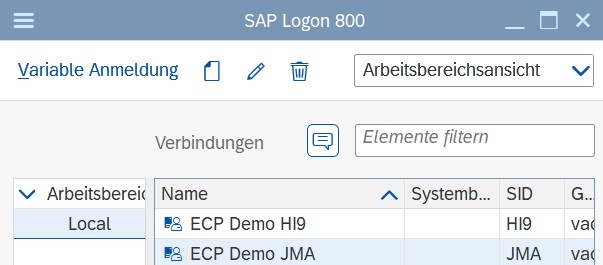
Myth busted: you can access ECP via Windows GUI, if you want to.
…to be continued.
Read this article to understand Employee Central Payroll in the context of all 7 SAP Payroll options.
If you believe you’ve found a downside of ECP vs. on-premise Payroll, please let us know. Maybe it’s a myth we can bust for you

Sven Ringling arbeitet bei ORBIS People im Bereich HCM Lösungen, insbesondere SAP SuccessFactors, Payroll, HR Shared Service und KI.
In über 30 Jahren als Consultant für die HR-Lösungen der SAP hat er für Beratungen in Deutschland, UK und Belgien gearbeitet und umfassende Erfahrungen gesammelt in Kundenprojekten unter anderem mit SAP HCM (on-premise) einschl. Payroll, SAP Concur, SAP SuccessFactors, Workforce Software, Qualtrics Employee Experience und Enterprise Service Management.