
Since the SAP SuccessFactors 2H 2025 Release release, it has been possible to integrate custom-built UI Integration Cards into the SuccessFactors Latest People Profile. To illustrate this, we present three use cases: some with custom BTP-Apps, some with integration to other systems (SAP H4S4). Afterwards, we explain the technical prerequisites and provide an outlook on further developments in this area.
Capabilities of SuccessFactors UI Integration Cards
UI Integration Cards in SuccessFactors offer the following capabilities:
- Visualisation of data and KPIs
- Targeted navigation to downstream applications
- Access to your own data as well as data of assigned employees
- Live connectivity to other systems such as SAP H4S4 or SAP ECC HCM without data replication
- Improved integration of Side-by-side Extensions
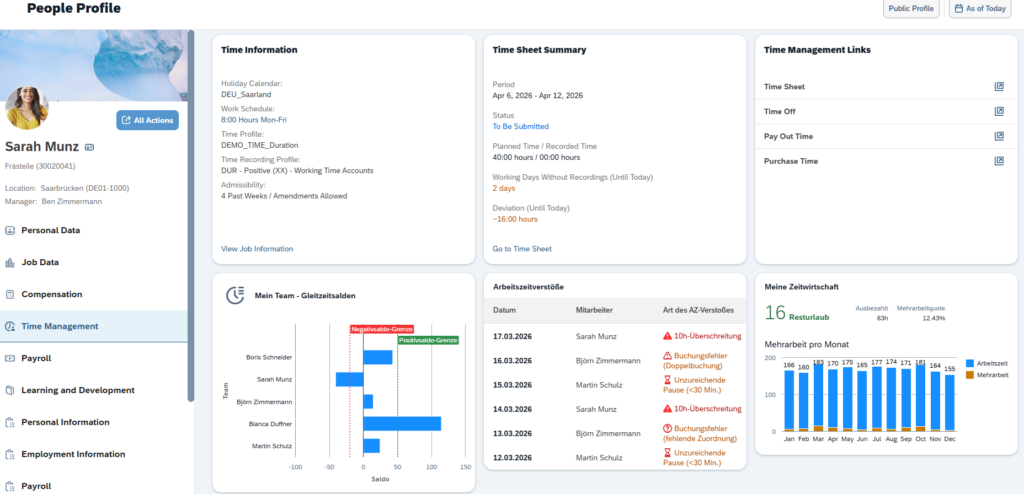
Show KPIs from SAP HCM Time&Attendance in SuccessFactors
Customers in a Core Hybrid Szenario, who are not using SuccessFactors Time Tracking, are often facing this challenge: important time management information is not visible for users in SuccessFactors. This data is managed in on‑premise (or private cloud) SAP HCM, for example via Employee and Manager Self-Services (ESS/MSS), and calculated through Time Evaluation (PT). UI Integration Cards provide an ideal way to read and analyze this data live. There offer a much better user experience and more options than Mash-ups. As a result, synchronization into custom MDF objects is no longer required just to view data. In addition, the UI Integration Cards can include direct links to the relevant Fiori applications, such as MSS reporting.
(note: some custom cards are specific for German entities and therefore shown in German only)
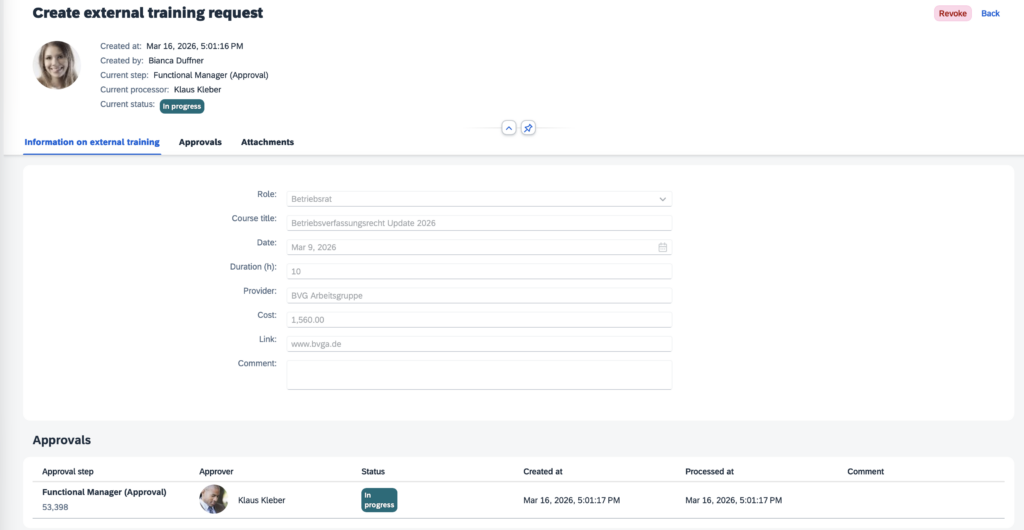
UI Integration Cards for custom BTP-App: external Trainings
Using our BTP CAP app “External Training”, we demonstrate how custom developments can be integrated smoothly into SuccessFactors.
- On the one hand, open to-dos for employees can be displayed as call-to-actions. This makes it immediately visible which trainings need to be attended soon or where confirmation of completion is still missing.
- On the other hand, all functions of the BTP app can be linked, giving employees quick access to the required application.

The BTP application opens without requiring a new login.
Extended Document Generation on BTP
Another interesting scenario is document generation over any above the limited standard document generation feature in SuccessFactors Employee Central or COMP. Via a side-by-side extension on SAP BTP, letters regarding salary changes or bonus payments can be displayed directly to employees and managers. Both historical and new documents are immediately accessible.
This not only improves the user experience, but also reduces the effort required to create and send letters.
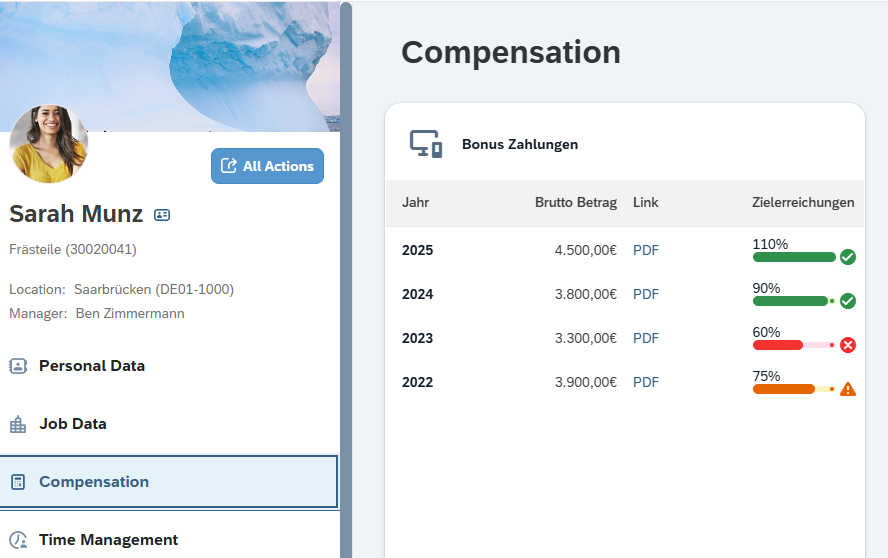
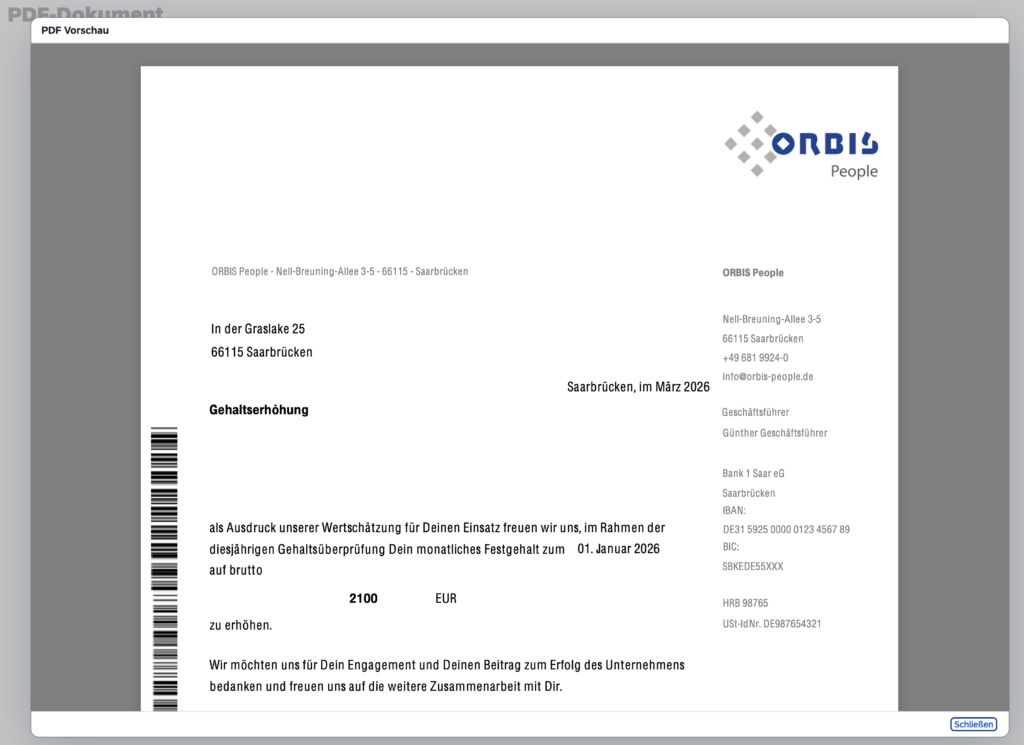
The BTP application for displaying employee documents can also be opened directly from the UI Integration Card without users switching applications. Just clicking the PDF link displayed in the image above opens the letter (here in German).
Technical Prerequisites for SuccessFactors UI Integration Cards
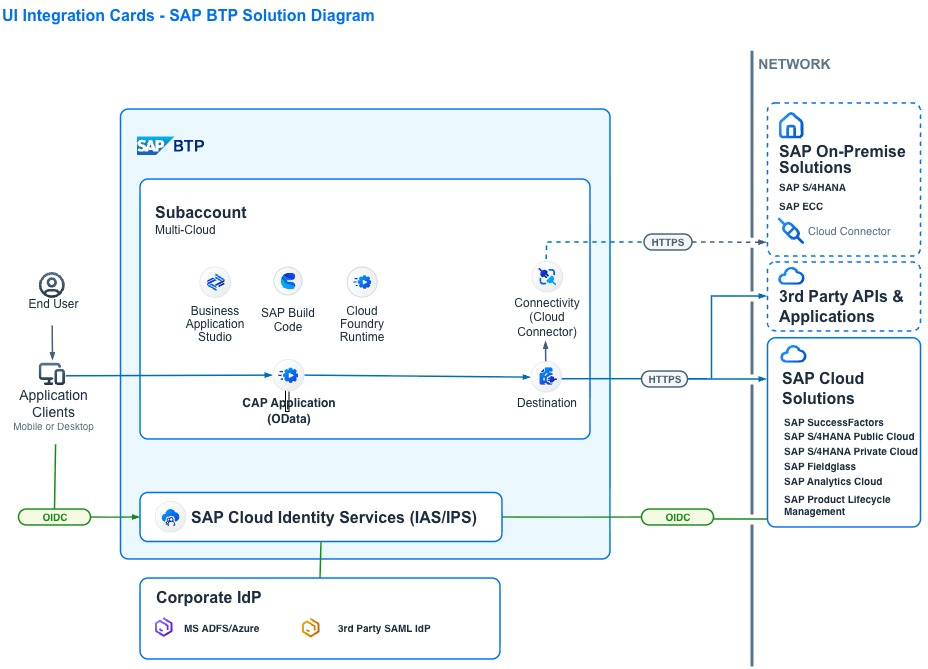
To use UI Integration Cards in SAP SuccessFactors, the following components are required:
BTP Subaccount with Cloud Foundry entitlement
- The data provisioning for the cards is implemented as an OData service here.
- Destinations and, if required, the Cloud Connector can be used to access various other systems to read and prepare data.
- If customers already use side-by-side extensions (BTP CAP apps), an existing subaccount can be reused.
Cloud Identity Services
- Authentication of the UI Integration Card to BTP is performed using OpenID Connect.
- This can be configured via Cloud Identity Services, which are typically already in place for SAP SuccessFactors authentication.
SAP Build Code / Business Application Studio on BTP
- The development and deployment of the CAP application is carried out in Business Application Studio.
- The UI Integration Card itself is defined within an SAP Build Code project and can be deployed directly to SAP SuccessFactors from there.
Conclusion and Outlook for the next SuccessFactors Release
- UI Integration Cards enhance side-by-side extensions through direct integration into the SuccessFactors UI.
- In hybrid system landscapes, data from partner systems can be accessed live.
- UI Integration Cards offer appealing and intuitive ways to visualise data or provide call-to-actions (see further examples)
- Line managers and HR have the same view as employees
- Setup in an existing BTP Cloud Foundry environment is quick and straightforward
- Additional integration options have already been announced for 2H 2026
If you need help in setting up UI integration cards or creating BTP extensions, please reach out.

Peter Gilberg arbeitet bei ORBIS People als Entwickler für die SAP Business Technology Plattform.